If you are treating internal linking as an afterthought, think again, it can have a massive positive impact on your SEO.
When you have invested time or money in writing an article for your website, it’s crucial that you don’t overlook internal linking and do it as a quick afterthought when you publish new content.
Internal linking is often looked at as something you do at the last minute or, even worse, something that can be automated via a WordPress plugin.
The truth is that if you automate or don’t do your internal linking properly, you might as well have not bothered writing the new content to start with.
Why do we blog, and why do we link internally?
Do you blog to rank? Probably; and this is where you are missing a trick.
With the onset of AI, there are over seven million new blog posts published every day, so in order to get a blog post ranking, you’ve got to do far more than write a world-beating article; you’ve got to spend on backlinks (if you are not getting organic ones) and other forms of promotion.
The odds of an article ranking top ten without significant investment are low, but there is another way that you can view blogs:
Don’t write to rank the individual post, write to help your landing pages rank.
This might sound obvious, but so much is written about how you should optimise your posts to try and rank – the benefits of the internal linking options are often overlooked.
If you write articles for your website and your main focus is getting them to rank, view them from another perspective: write them to get your other content ranking.
Internal links help the search engines understand your site.
Paired with a great URL structure, internal linking can help Google understand your most important content and what you want to rank for.
A blog or article on a topic that links back to a landing page on your site using appropriate anchor texts helps the search engines understand your site – irrespective of where the article ranks in the SERPs.
Well-chosen anchors that link back to your main pages make a massive difference in the performance of those linked-to pages.
This used to be one of the main points of focus for blogging and article writing on sites, but it seems that the focus has shifted to getting individual blogs to rank rather than using blogs to push up the rankings of your important landing pages.
I think this is where the snake-oil SEO tutorials have come into play—marketers are led to believe that blog content should be the lead singer rather than the rhythm section (and anyone who knows music knows these two hold everything together).

Do you need some help with your internal linking?
I can help you with your site’s internal links by auditing them and then guiding you through the process.
Book a callSo how do you get internal linking right?
This depends on the size of your site.
If you have a massive website and your internal linking is all over the place, it will take a lot of work.
If you have a small site and have not implemented internal linking correctly, it will still take time, but not as much.
Basically, you want every blog post on your site to be internally linked back to a page you want to rank on using a wide range of unique anchor text that means pretty much the same thing to search engines.
Here’s a process that’s simple and easy to follow, but it’s still going to take time.
- Get a list of every URL on your website on a spreadsheet
- Organise this into post types – so you know what are your landing pages and what are your blogs (if your site URL structure is crap, this can take some time)
- Identify the main pages you want to rank (the pages that convert, not the ones that have informational intent)
- List the anchors that already link back to them
- Add the anchors that you want to link back to them on a per-post basis
- Go through all your posts, articles, blogs or whatever you call them
- Find the internal linking opportunities – rewriting content as required to get the internal links in place
- Add the links using appropriate anchor texts
- Monitor all the content so you are not stuffing links or watering down the link juice from your blogs (don’t put 20 links on one page to another, or the search engine bots won’t know if they are coming or going
There is no easy option for internal linking.
Plugins like Yoast and Rank Math are great, but I recommend that you sweat the small stuff with your internal linking and not outsource it to an algorithm.
Human-created internal anchors can provide the nuance you need for your internal linking, so don’t be lazy. When you have invested in writing the content, don’t shirk the internal linking.
What should you be internally linking to?
Every link you add to your page waters down the link juice the link passes to the linked page.
This means that if you have 20 inline (main content) links on your page, each gets five per cent of the link juice.
You can ignore header, footer and sidebar links if your site is built correctly, as the search engine bots will understand the following as structural links:
- <header>
- <aside>
- <footer>
Bots know these, so don’t worry about links to your content from these sections.
External links are also something that you should have on your post, but again, bots know these and expect to find them; don’t add loads, but make sure you spend time researching them – don’t just link to the first site you see in a search – you want authoritative external links, not shit ones.
Link carefully and with reason.
Take your time on this. Find contextually correct content and use it to link back to your main service pages.
You want to write blogs around your service page and then use a range of anchor tests to link back to that page.
What is a contextual link?
The last thing you want on your site is loads of internal links with the same anchor texts. This is one potential issue when using a plugin to automate the process—you end up with jibberish links that make no sense.
As an example, I will use this blog and site to outline how you should do it.
This blog is about internal linking for on-page SEO, so my on-page SEO services would be a natural page to link back to.
First, I use the free WILO plugin to check what links to the page.
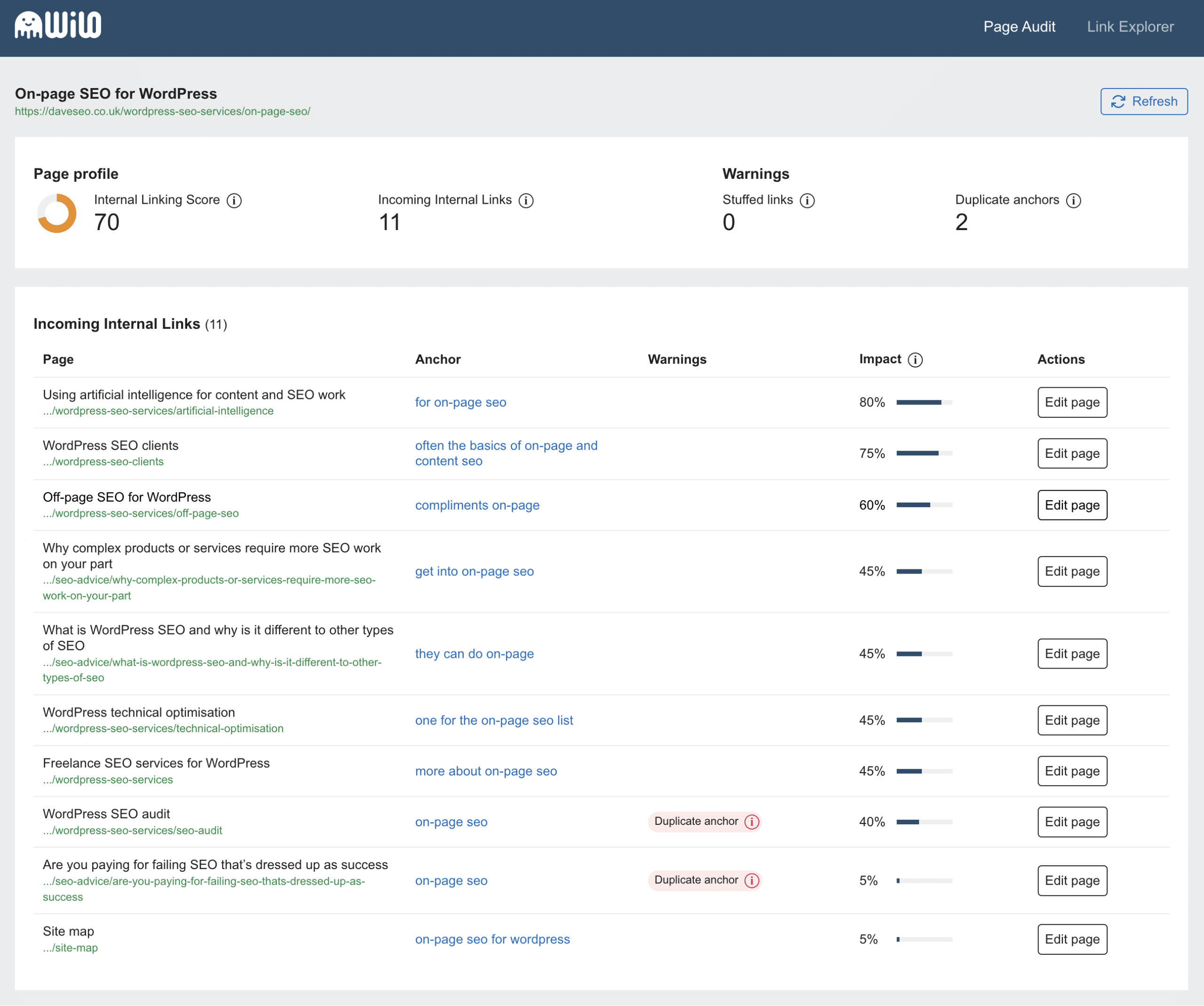
Click to enlarge the image.
I use this plug to get an instant live report on my site about what pages and anchor texts link back to that page.
From this, I can see that I am not already using on-page SEO services as an internal link, so it makes perfect sense to use this as an internal link on this blog post.
As on-page SEO services are one of my most popular services, I also want to help more people with this service, so the link makes even more sense.
Note that I have added some context around this link; this is done as search engines will look at the text before and after the link to give it context.
It’s not much more complex than that.
Sometimes, it may be tricky to find variations for the anchor text, but you can use something like Chat GPT or Gemini to get more options.
Here, I used the prompt:
Please give me some options for internal link anchor text to a page titled On-page SEO services for WordPress.
And got these results:
Short and Sweet
- On-page SEO
- WordPress SEO
- SEO Services
- Optimize Your WordPress Site
More Descriptive
- Improve Your WordPress Site’s Search Rankings
- Get Expert On-Page SEO for WordPress
- Boost Your Website’s Visibility with On-Page SEO
- Enhance Your WordPress Site’s SEO
Keyword-Rich
- WordPress On-Page SEO Services
- Professional WordPress SEO Optimization
- Expert WordPress SEO Consulting
Call to Action
- Learn More About WordPress SEO
- Get Started with WordPress SEO
- Discover Our WordPress SEO Services
These are great anchor text options, but the skill here is in weaving them naturally into your post content within the context of the current blog.
What should you link to?
This is another area where the advice varies; some say you should link horizontally and vertically, which means you link to other relevant blogs (horizontally) to boost their on-page and landing pages (vertically) to increase theirs.
Your blogs probably have many internal links from the archive, category, and tag pages, so I mainly focus on vertical internal linking to boost my main converting pages unless there is a compelling reason to do so.
Bringing it all together.
Sweat your internal links. Doing so will improve the quality of your site for your visitors and, ultimately, for the search engines.
If you are starting on a site, ensure internal linking is part of your posting process.
If you already have a large site, go through every blog post and check your links (again, this is where the WILO plugin comes in handy).
This might seem like a daunting task, but if you invest the time, you will see the results in the SERPs.
What is WILO?
WordPress Internal Link Optimiser is a free WordPress plugin I designed and co-built with my developer colleague Aaron Jones.
It’s the WordPress SEO tool you never knew you needed and is designed to make the manual process of optimising your internal links less painful.
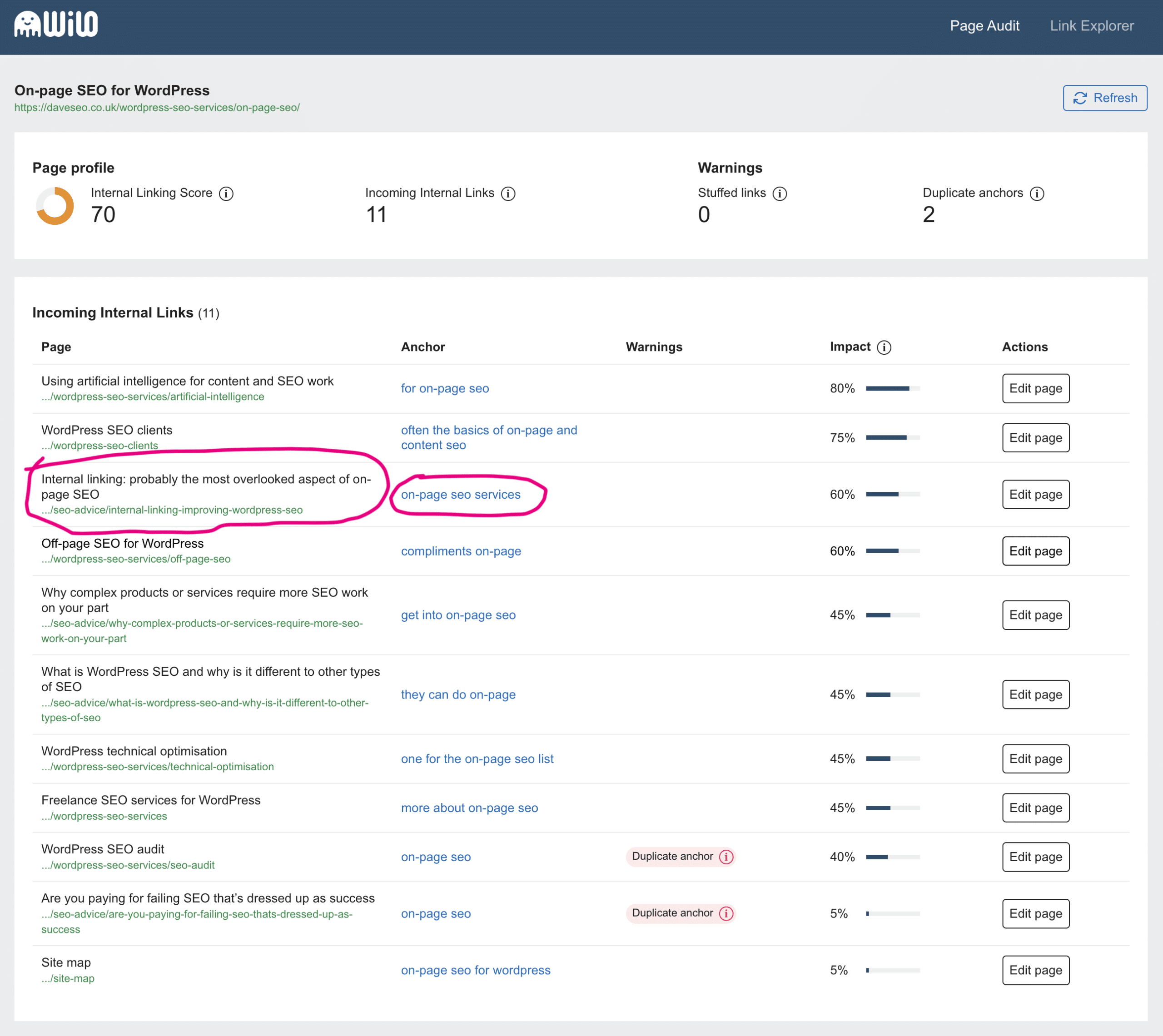
Now that I have added the internal link to this blog, on the target page, WILO clearly shows the incoming link and the anchor text.
Using WILO makes it really easy to get a broad and sensible range of internal link anchor texts. Give it a try, it’s free.

Dave
Dave is a WordPress SEO expert with over 20 years experience in designing, building and optimising WordPress (and non-WordPress) websites for people who are serious about SEO and want to generate more new business from their websites. He's run a creative agency for 25+ years, employs 17 staff and enjoys a good rant about SEO.


